



Form to Excel
 How do I set write permissions on the required folder?
Can I use Form to Excel and Mail and Form Captcha in the same form ?
I'm having problems with the encoding of special characters, there is a work around?
Is it possible using this tool to send through multiple selections in the same list box?
I'm not receiving any mail, why?
How can I configure Form2Excel with a different email server and with SMTP authentication?
I'm getting a blank email. Why?
The data.csv result file is being created / updated in multiple places. There is a way to fix it?
I have problems while downloading the file. How can I download it?
I don't have a credit card. Are there alternative payment options?
Do you offer a multi-domain license?
I'm getting this error message "Is not possible to create data structure.". What's happening?
Can I pay using my credit card ?
Can I use these extensions with MACs ?
I have downloaded the new program, but cannot seem to access it from the command panel.
I'm getting this message "Please define your site first.". What I should do?
This extension works with Dreamweaver CC?
I'm getting this error: "TypeError: THE_DOM has no properties" . There is a workaround?
I'm getting the error "Can't update menus. Extension will not be installed". What is the solution?
How do I set write permissions on the required folder?
For Linux/Unix servers
FTP programs ("clients") allow you to set permissions for files and directories on your remote host. This function is often called chmod or set permissions in the program menu.In the first image, look at the last column - that shows the permissions. It looks a bit confusing, but for now just note the sequence of letters:
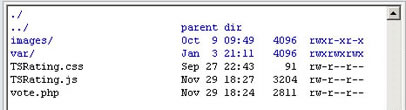
Right click the folder or files to set permissions, and usually a popup screen will appear (see the second image):
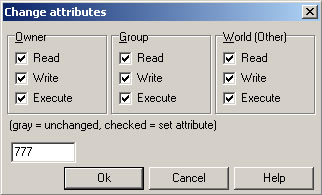
Don't worry about the check boxes. Just delete the 'Numeric value:' and enter the number you need - in this case it's 777 or simply mark all checkboxes. Then click OK.
That's all.
For Windows servers
There should be an option in your web hosting control panel to set write permissions. If it's not present, you may can contact your web hosting service and request the write permissions for the PHP code.
How can I edit the "Form2Excel.php" document so that when the email comes through, it has the email address and subject filled out from the user on the form, instead of the default values?
Change #1: Subject, line #660:
$emailsubject= $_POST["name-of-the-subject-field-on-your-form"];
Change #2: From Name (add this one), line #597:
$mail->FromName = $_POST["name-of-the-name-field-on-your-form"];
Change #3: From Email, line #598:
$mail->From = $_POST["name-of-the-email-field-on-your-form"];
Replace the strings marked in red with the field names from your form.
Can the form send a CC to the user as well? We want the user to receive a copy of the email for their records with a "thank you" comment at the top.
Yes, it's possible. Add this code at line # 699 (into the PHP file):
send_mail($_POST["clientemail"], $fromaddress, $emailsubject, "Thank you!" . $body, $attachments);
In your form "clientemail" is the name of the field where the client enter his email address.
Can I use Form to Excel and Mail and Form Captcha in the same form ?
- Insert Form to Excel and Mail into your form as always.
- Once inserted Form to Excel and Mail, insert Form Captcha.
- Select the file "HDWForm2Mail/Form2Excel.php" as the page to protect. Click the "Browse" button to select this file.
- Configure others parameters of Form Captcha in the "Insert Captcha" setup window
- Update all the files in your web server.
I am getting them email with form submission and the data is being saved in the excel file, but the attachments are not coming through ...why?
<form action="/HDWForm2Excel/Form2Excel.php" method="post" enctype="multipart/form-data">
These attributes are requiredin order to upload files using the form.
Is there any way to see the data on the web or do I have to download the CSV file to see it everytime?
I'm having problems with the encoding of special characters, there is a work around?
Follow these steps:
- Add the char-set that you are using into your <FORM ...> tag, example:
<form accept-charset="iso-8859-1" ...
- Open the file "HDWForm2Mail/Form2Excel.php" and put SPECIAL_CHARACTERS to true on line #92:
define('SPECIAL_CHARACTERS', true);
- Specify your char-set again on line #93:
define('CHAR_SET', "iso-8859-1");
- utf-8
- windows-1256
- iso-8859-1
Is it possible using this tool to send through multiple selections in the same list box?
Yes, you can use <select multiple="multiple" ...> and <select multiple ...> tags.
In PHP, to be able to post select multiple fields you need to add the characters [] at the end of the field's name, example:
<select name="items[]" size="5" multiple="multiple"> I'm not receiving any mail, why?
How can I configure Form2Excel with a different email server and with SMTP authentication?
If you want to use an external email server, you can do the following:
STEP 1- Go to Line #823 and configure the Form2Excel.php file to send primary via SMTP:
var $Mailer = "mail";
...change by:
var $Mailer = "smtp";
Note: This first step is required only in a few servers, in most cases Form2Excel detects automatically that the available method is SMTP.
STEP 2- Go to Line #59 and put there your SMTP server address if is different than "localhost"
define('SMTP_SERVER', 'localhost');
Note: STEPS 3 and 4 are required only if your server required authentication. If authentication is not required, please ignore these steps:
STEP 3- Go to Line #63 to activate authentication:
define('USE_SMTP_AUTHENTICATION', false);
...change by:
define('USE_SMTP_AUTHENTICATION', true);
STEP 4- On the lines #64 and #65 put your username and password.
I'm getting a blank email. Why?
- Open the Form2Excel.php file
- Go to line #91
- Set the USE_HTML_FORMATTING constant to false:
define('USE_HTML_FORMATTING', false);
Can I put delivery email address into the php page itself? I don't want it as a hidden field in the HTML on the page.
Yes, it's possible. The PHP file is open for edition. For this change, go to the line #653 (into the PHP file) and change this line:
$emailaddress= getHDWForm2MailParam(HDW_F2M_EMAIL);
...by this one:$emailaddress= "your-own-email@yourdomain.com";
The data.csv result file is being created / updated in multiple places. There is a way to fix it?
That happens if your website appears under various canonical domain names or IP addresses. To solve that problem open the Form2Excel.php file, go to the line #99 and fix the folder postfix there, example:
define('FOLDER_POSTFIX', '8n5f');
When I double click the MXP file I'm getting this error: "Extension requires more recent version of Macromedia Extension Manager". How can I solve this?
Download the most recent version of the Adobe/Macromedia Extension Manager or the version related to your Dreamweaver version:
http://www.adobe.com/exchange/em_download/After installed open the MXP file from the Extension Manager menu to be sure that you are installing the extension using the correct Extension Manager.
I have problems while downloading the file. How can I download it?
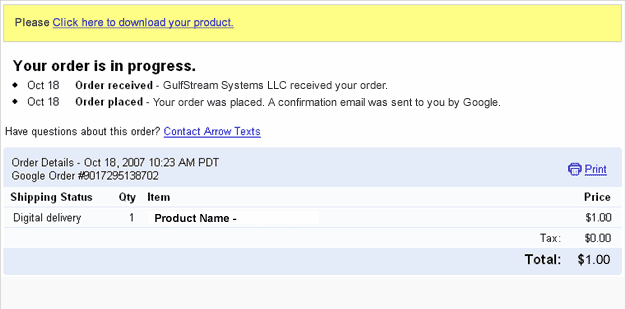
After accessing that link you will get a copy of the product and a copy of the download link will be sent to your email address. If you have not received the email, please check your spam/bulk mail folder.
If you lost both download links, please contact our support service and we will send you a new download link. Please include the email used for payment in your message;
I don't have a credit card. Are there alternative payment options?
Moneybookers is accepted in almost all countries.
Do you offer a multi-domain license?
I'm getting this error message "Is not possible to create data structure.". What's happening?
Please, change the "Links relative to" setting in the site configuration options (Dreamweaver 8 or later).
If this setting does not solve the problem, then follow these steps:
- Restart Dreamweaver
- Be sure that you have a local web site defined in Dreamweaver
- Open the page where you want to insert the extension(this page must be saved previously into your web site)
- Try to insert the extension again
Can I pay using my credit card ?
We also accept MoneyBookers (accepts credit cards when uploading funds).
Can I use these extensions with MACs ?
I have downloaded the new program, but cannot seem to access it from the command panel.
I'm getting this message "Please define your site first.". What I should do?
It's required to define a working site in Dreamweaver because Dreamweaver needs to know where to place the files.
Download here a PDF document with help about defining a site in Dreamweaver.
This extension works with Dreamweaver CC?
When I preview my web page after I get this message in my Internet Explorer,"To help protect your security, Internet Explorer has restricted...". What is the problem?
If you are testing your page directly from your local hard disk in IE 7, this message appears:
"To help protect your security, Internet Explorer has restricted this webpage from running scripts or ActiveX controls that could access your computer. Click here for options."
In IE 7 this message appears when you test a web page that contains a script or Flash item directly form your local hard disk. When you upload your page to an online web server that message does not appear.
The address from a web server must start with http:// or https:// . On the other hand if the address starts with C:\ or file:// then you are testing it from your local hard disk.
Just upload your web page to your web site and you will see that the error disappears.
I'm getting this error: "TypeError: THE_DOM has no properties" . There is a workaround?
- Check if you have defined a local web site at dreamweaver.
- Check if you have saved the page into your local web site.
- If you are using Dreamweaver templates, check if your templates allow an "Editable Region" in the <HEAD> section of the HTML code.
- Mark the "Use case-sensitive link checking" option in the site settings and recreate your site cache.
- After these checks, please restart your Dreamweaver and try again.
I'm getting the error "Can't update menus. Extension will not be installed". What is the solution?
That's due to a bug in the Adobe Extension Manager that sometimes corrupts the "Menus.xml" file. That file can be found in the following location:
Windows users: C:\Documents and Settings\[UserName]\Application Data\Macromedia\Dreamweaver [version]\Configuration\Menus\menus.xml
Mac users: HD:Users:username:Library: Application Support:Macromedia:Dreamweaver [version]:Configuration:Menus:Menus.xml
To fix this problem close your Dreamweaver and try the following:
- Un-install all your extensions and then re-install them one at a time. This will work in most cases.
- If the above doesn't work then delete the "Menus.xml" file. After this you will need to disable and enable your extensions in order to get the menu entries again.
- If none of the above works then there is more than one file corrupted, the solution in this case will be to completely uninstall Dreamweaver and reinstall it again.