



Relational List
 The select fields are not properly associated, why?
Is it possible to add a second subordinate list, a third list/menu based on the 2 previous ones?
Is it possible to show an option selected as default?
I have problems while downloading the file. How can I download it?
I don't have a credit card. Are there alternative payment options?
Do you offer a multi-domain license?
I'm getting this error message "Is not possible to create data structure.". What's happening?
Can I pay using my credit card ?
Can I use these extensions with MACs ?
I have downloaded the new program, but cannot seem to access it from the command panel.
I'm getting this message "Please define your site first.". What I should do?
This extension works with Dreamweaver CC?
I'm getting this error: "TypeError: THE_DOM has no properties" . There is a workaround?
I'm getting the error "Can't update menus. Extension will not be installed". What is the solution?
The select fields are not properly associated, why?
Is it possible to add a second subordinate list, a third list/menu based on the 2 previous ones?
The extension has been designed to generate the code only for one pair of lists, however with a bit of coding you can add additional related lists, and the following is an example with three lists:
<html>
<head>
<script type="text/javascript" src="RelationalList.js"></script>
<script type="text/javascript">
var myRelationalInfo;
function LoadRelationalList(){
myRelationalList = new RelationalList('country', 'state', 'countries.xml', 'states.xml');
myRelationalList2 = new RelationalList('state', 'city', 'states.xml', 'cities.xml');
}
</script>
</head>
<body>
<select id="country"></select>
<select id="state"></select>
<select id="city"></select>
</body>
</html>
If you want to add a new level then just add a new line into the JavaScript function:
myRelationalList3 = new RelationalList('city', 'district', 'cities.xml', 'districts.xml');
and a new list item:
<select id="district"></select>
Is it possible to show an option selected as default?
<option value="US">United States</option>
The Relational List (JavaScript) code in your page is similar to this one:
var RelationalList0 = new RelationalList('ListA', 'ListB', 'country.xml', 'states.xml');
If you want to show the country “United States” (according to the previous example) then you need to add a new parameter to the function with the ‘US’ value. Example:
var RelationalList0 = new RelationalList('ListA', 'ListB','country.xml', 'states.xml', 'US');
If the ListA allows multiple selection then you can pass an array with multiple values as parameter. For example if the Canadian option is:
<option value="CA">Canada</option>
… and we want to select both Canada and United States in the ListA then the code is:
var RelationalList0 = new RelationalList('ListA', 'ListB','country.xml', 'states.xml', ['US', 'CA']);
The same applies to the ListB, in this case a sixth parameter should be added to the function to specify the item selected as default in the second list.
For example, if the “Florida” state option is as follows in the XML file:
<option value="FL">Florida</option>
… and we want to select this state, then the correct code is this one:
var RelationalList0 = new RelationalList('ListA', 'ListB','country.xml', 'states.xml', 'US', 'FL');
When I double click the MXP file I'm getting this error: "Extension requires more recent version of Macromedia Extension Manager". How can I solve this?
Download the most recent version of the Adobe/Macromedia Extension Manager or the version related to your Dreamweaver version:
http://www.adobe.com/exchange/em_download/After installed open the MXP file from the Extension Manager menu to be sure that you are installing the extension using the correct Extension Manager.
I have problems while downloading the file. How can I download it?
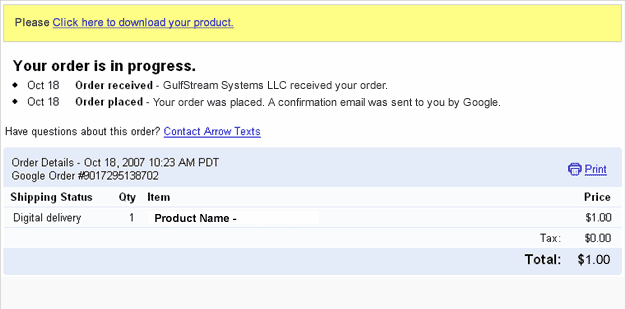
After accessing that link you will get a copy of the product and a copy of the download link will be sent to your email address. If you have not received the email, please check your spam/bulk mail folder.
If you lost both download links, please contact our support service and we will send you a new download link. Please include the email used for payment in your message;
I don't have a credit card. Are there alternative payment options?
Moneybookers is accepted in almost all countries.
Do you offer a multi-domain license?
I'm getting this error message "Is not possible to create data structure.". What's happening?
Please, change the "Links relative to" setting in the site configuration options (Dreamweaver 8 or later).
If this setting does not solve the problem, then follow these steps:
- Restart Dreamweaver
- Be sure that you have a local web site defined in Dreamweaver
- Open the page where you want to insert the extension(this page must be saved previously into your web site)
- Try to insert the extension again
Can I pay using my credit card ?
We also accept MoneyBookers (accepts credit cards when uploading funds).
Can I use these extensions with MACs ?
I have downloaded the new program, but cannot seem to access it from the command panel.
I'm getting this message "Please define your site first.". What I should do?
It's required to define a working site in Dreamweaver because Dreamweaver needs to know where to place the files.
Download here a PDF document with help about defining a site in Dreamweaver.
This extension works with Dreamweaver CC?
When I preview my web page after I get this message in my Internet Explorer,"To help protect your security, Internet Explorer has restricted...". What is the problem?
If you are testing your page directly from your local hard disk in IE 7, this message appears:
"To help protect your security, Internet Explorer has restricted this webpage from running scripts or ActiveX controls that could access your computer. Click here for options."
In IE 7 this message appears when you test a web page that contains a script or Flash item directly form your local hard disk. When you upload your page to an online web server that message does not appear.
The address from a web server must start with http:// or https:// . On the other hand if the address starts with C:\ or file:// then you are testing it from your local hard disk.
Just upload your web page to your web site and you will see that the error disappears.
I'm getting this error: "TypeError: THE_DOM has no properties" . There is a workaround?
- Check if you have defined a local web site at dreamweaver.
- Check if you have saved the page into your local web site.
- If you are using Dreamweaver templates, check if your templates allow an "Editable Region" in the <HEAD> section of the HTML code.
- Mark the "Use case-sensitive link checking" option in the site settings and recreate your site cache.
- After these checks, please restart your Dreamweaver and try again.
I'm getting the error "Can't update menus. Extension will not be installed". What is the solution?
That's due to a bug in the Adobe Extension Manager that sometimes corrupts the "Menus.xml" file. That file can be found in the following location:
Windows users: C:\Documents and Settings\[UserName]\Application Data\Macromedia\Dreamweaver [version]\Configuration\Menus\menus.xml
Mac users: HD:Users:username:Library: Application Support:Macromedia:Dreamweaver [version]:Configuration:Menus:Menus.xml
To fix this problem close your Dreamweaver and try the following:
- Un-install all your extensions and then re-install them one at a time. This will work in most cases.
- If the above doesn't work then delete the "Menus.xml" file. After this you will need to disable and enable your extensions in order to get the menu entries again.
- If none of the above works then there is more than one file corrupted, the solution in this case will be to completely uninstall Dreamweaver and reinstall it again.